Across-Sessions Within Subject Testing with glhmm toolbox#
In this tutorial, we are going to look at how to implement the across sessions within subject testing using the glhmm toolbox. This test is used for studying variability between different sessions in studies spanning multiple scanning sessions and is therefore ideal for longitudinal studies.
In the real world scenarios, one would typically fit a Hidden Markov Model (HMM) to an actual dataset. However, for the sake of showing the concept of statistical testing, we just use synthetic data for both the independent variable and the dependent variable for the across_sessions_within_subject test.
We create synthetic data using the toolbox Genephys, developed by Vidaurre in 2023 (accessible at https://doi.org/10.7554/eLife.87729.2). Genephys makes it possible to simulate electrophysiological data in the context of a psychometric experiment. Hence, it can create scenarios where, for example, a subject is exposed to one or multiple stimuli while simultaneously recording EEG or MEG data.
While the process of preparing the data requires some explanation, executing the test (across_sessions_within_subject) itself is straightforward —simply input the variables D and R, and define the specific method you wish to apply. The methods include permutation using regression or permutation using correlation and is described in the paper Vidaurre et al.
2023.
Table of Contents#
Load and prepare data
Look at data
Prepare data for HMM
Load data or initialise and train HMM
Data restructuring
Across-sessions within subject testing
Across-sessions within subject testing - Regression
Across-sessions within subject testing - Correlation
Install necessary packages#
Let’s start by importing the required libraries and modules.
First, we will need to import the GLHMM-package as glhmm:
If you dont have the GLHMM-package installed, then run the following command in your terminal:
pip install --user git+https://github.com/vidaurre/glhmm
To use the function glhmm.statistics.py you also need to install the library’s:
pip install statsmodels
pip install tqdm
python -m pip install -U scikit-image
```
Import libraries#
Let’s start by importing the required libraries and modules.
[34]:
import os
import numpy as np
import pandas as pd
import glhmm.glhmm as glhmm
import glhmm.graphics as graphics
import glhmm.preproc as preproc
import glhmm.statistics as statistics
1. Load and prepare data#
[35]:
# Get the current directory
current_directory = os.getcwd()
folder_name = "\\data_statistical_testing"

# Load D data
file_name = '\\D_sessions.npy'
file_path = os.path.join(current_directory+folder_name+file_name)
D_sessions = np.load(file_path)

# Load R data
file_name = '\\R_sessions.npy'
file_path = os.path.join(current_directory+folder_name+file_name)
R_sessions = np.load(file_path)

# Load indices
file_name = '\\idx_sessions.npy'
file_path = os.path.join(current_directory+folder_name+file_name)
idx_sessions = np.load(file_path)


print(f"Data dimension of D-session data: {D_sessions.shape}")
print(f"Data dimension of R-session data: {R_sessions.shape}")
print(f"Data dimension of indices: {idx_sessions.shape}")
Data dimension of D-session data: (250, 1500, 16)
Data dimension of R-session data: (1500,)
Data dimension of indices: (10, 2)
[36]:
current_directory = os.getcwd()
folder_name = "\\data_statistical_testing"

# Define file name
file_name = '\\Gamma_sessions.npy'
# Define file path
file_path = os.path.join(current_directory+folder_name+file_name)
# Load Gamma
Gamma = np.load(file_path)
print(f"Data dimension of Gamma: {Gamma.shape}")
Data dimension of Gamma: (375000, 6)
Look at data#
Now we can look at the data structure. - D_sessions: 3D array of shape (n_timepoints, n_trials, n_features) - R_sessions: 3D array of shape (n_trials,) - idx_data: 2D array of shape (n_sessions, 2)
D_sessions represents the data collected from the subject, structured as a list with three elements: [250, 1500, 16]. The first element indicates that the subject underwent measurement across 250 timepoints. The second element, 1500, corresponds to the total number of trials conducted. In this context, 10 distinct sessions were executed, each comprising 150 trials, lead up to a total of 1500 trials (150*10). Each individual trial involved the measurement of 16 channels within
the EEG or MEG scanner.
R_sessions simulates the measured reaction time for each trial that the subject undergoes at different sessions.
Lastly, we have idx_data = [10, 2]. This indicates the number of sessions conducted, which in this case is 10. The values in each row represent the start and end indices of the trials.
Prepare data for HMM#
When you’re getting into training a Hidden Markov Model (HMM), the input data needs to follow a certain setup. The data shape should look like ((number of timepoints * number of trials), number of features). This means you’ve lined up all the trials from different sessions side by side in one long row. The second dimension is the number of features, which could be the number of parcels or channels.
So, in our scenario, we’ve got this data matrix, D_session, shaped like [250, 1500, 16] (timepoints, trials, channels). Now, when we bring all those trials together, it’s like stacking them up to create a new design matrix, and it ends up with a shape of [375000, 16] (timepoints * trials, channels). Beside that we also need to update R_session and idx_sessions to sync up with the newly concatenated data. To make life easier, we’ve got the function
get_concatenate_sessions. It does the heavy lifting for us.
[37]:
D_con,R_con,idx_con=statistics.get_concatenate_sessions(D_sessions, R_sessions, idx_sessions)
print(f"Data dimension of the concatenated D-data: {D_con.shape}")
print(f"Data dimension of the concatenated R-data: {R_con.shape}")
print(f"Data dimension of the updated time stamp indices: {idx_con.shape}")
Data dimension of the concatenated D-data: (375000, 16)
Data dimension of the concatenated R-data: (375000,)
Data dimension of the updated time stamp indices: (10, 2)
For a quick sanity check, let’s verify whether the concatenation was performed correctly on D_sessions. We’ve essentially stacked up every timepoint from each trial sequentially.
D_sessions[:, 0, :], with the corresponding slice in the concatenated data, D_con[0:250, :].D_sessions[:, 0, :] == D_con[0:250, :] holds true, we’re essentially confirming that all timepoints in the first trial align perfectly with the first 250 values in our concatenated data. It’s like double-checking to make sure everything lined up as expected.[38]:
D_sessions[:,0,:]==D_con[0:250,:]
[38]:
array([[ True,  True,  True, ...,  True,  True,  True],
       [ True,  True,  True, ...,  True,  True,  True],
       [ True,  True,  True, ...,  True,  True,  True],
       ...,
       [ True,  True,  True, ...,  True,  True,  True],
       [ True,  True,  True, ...,  True,  True,  True],
       [ True,  True,  True, ...,  True,  True,  True]])
Here, it’s evident that the concatenation process has been executed accurately.
Next up, let’s confirm if the values in idx_con have been appropriately updated. Each row in this matrix should represent the total count of timepoints and trials for each of the 10 sessions. In our case, it should total to 37500 for each session (calculated as 250 time points * 150 trials).
[39]:
idx_con
[39]:
array([[     0,  37500],
       [ 37500,  75000],
       [ 75000, 112500],
       [112500, 150000],
       [150000, 187500],
       [187500, 225000],
       [225000, 262500],
       [262500, 300000],
       [300000, 337500],
       [337500, 375000]])
Indeed, each session now aligns with 37500 datapoints. This means that when we pooled together the timepoints and trials, the count for each session ended up exactly as expected. It’s a reassuring confirmation that our concatenation didn’t miss a beat.
Please take note: If the measurements haven’t been continuously recorded within a single session but have been pre-processed and exported on a trial-by-trial basis, we’ll need to construct the indices in a different manner. In our case, where we have 250 timepoints for each trial, where each trial consists of 250 timepoints and there are a total of 1500 trials, the indices must be created by specifying the start and end timepoints for each trial.
You can create these indices using the get_timestamp_indices function. The following example will guide you through the process.
```python idx_data =statistics.get_timestamp_indices(D_trials.shape[0], D_trials.shape[1]) print(f”Values in index:\n{idx_data}\n”) print(f”Shape of index: {idx_data.shape}”)
Values in index: [[ 0 250] [ 250 500] [ 500 750] … [374250 374500] [374500 374750] [374750 375000]]
Shape of index: (1500, 2)
2. Load data or initialise and train HMM#
You can either load the Gamma values from a pretrained model or train your own model. If you prefer the former option, load up the data from the data_statistical_testing folder.
current_directory = os.getcwd()
folder_name = "\\data_statistical_testing"

# Define file name
file_name = '\\Gamma_sessions.npy'
# Define file path
file_path = os.path.join(current_directory+folder_name+file_name)
# Load Gamma
Gamma = np.load(file_path)
print(f"Data dimension of Gamma: {Gamma.shape}")
The GLHMM model in question has been trained utilizing a Gaussian observation model, incorporating mean and covariance parameters for 8 distinct states.
However, if you would rather train your own model, you can use the variables D_con and idx_con as inputs and and complete this section.
[40]:
current_directory = os.getcwd()
folder_name = "\\data_statistical_testing"

# Define file name
file_name = '\\Gamma_sessions.npy'
# Define file path
file_path = os.path.join(current_directory+folder_name+file_name)
# Load Gamma
Gamma = np.load(file_path)
print(f"Data dimension of Gamma: {Gamma.shape}")
Data dimension of Gamma: (375000, 6)
Our modeling approach involves representing states as Gaussian distributions with mean and a full covariance matrix. This means that each state is characterized by a mean amplitude and a functional connectivity pattern. To specify this configuration, set covtype='full' and the number of states to K=6. If you prefer not to model the mean, you can include model_mean='no'. Optionally, you can check the hyperparameters to make sure that they correspond to how you want the model to be set
up.
[41]:
# Create an instance of the glhmm class
K = 6 # number of states
hmm = glhmm.glhmm(model_beta='no', K=K, covtype='full')
print(hmm.hyperparameters)
{'K': 6, 'covtype': 'full', 'model_mean': 'state', 'model_beta': 'no', 'dirichlet_diag': 10, 'connectivity': None, 'Pstructure': array([[ True,  True,  True,  True,  True,  True],
       [ True,  True,  True,  True,  True,  True],
       [ True,  True,  True,  True,  True,  True],
       [ True,  True,  True,  True,  True,  True],
       [ True,  True,  True,  True,  True,  True],
       [ True,  True,  True,  True,  True,  True]]), 'Pistructure': array([ True,  True,  True,  True,  True,  True])}
D_con) and time indices (idx_con).Since in this case, we are not modeling an interaction between two sets of timeseries but opting for a “classic” HMM, we set X=None. For training, Y should represent the timeseries from which we aim to estimate states (D_con), and indices should encompass the beginning and end indices of each subject (idx_con).
[49]:
Gamma,Xi,FE = hmm.train(X=None, Y=D_con.astype(np.float64), indices=idx_con)
Init repetition 1 free energy = 9611357.149320949
Init repetition 2 free energy = 9618477.509476783
Init repetition 3 free energy = 9621385.247151058
Init repetition 4 free energy = 9606346.545488238
Init repetition 5 free energy = 9613070.090322018
Best repetition: 4
Cycle 1 free energy = 9608743.309962321
Cycle 2 free energy = 9599146.379085556
Cycle 3, free energy = 9595952.667584648, relative change = 0.24969125135436857
Cycle 4, free energy = 9593744.46989156, relative change = 0.14722456421104277
Cycle 5, free energy = 9591969.75980401, relative change = 0.10580408266580568
Cycle 6, free energy = 9590516.00973263, relative change = 0.07975674142966233
Cycle 7, free energy = 9589318.191362092, relative change = 0.06166337489047422
Cycle 8, free energy = 9588314.733084206, relative change = 0.049120322177787404
Cycle 9, free energy = 9587446.44765255, relative change = 0.040770580145825915
Cycle 10, free energy = 9586667.157245994, relative change = 0.035300100364881015
Cycle 11, free energy = 9585947.039195733, relative change = 0.03158929184662664
Cycle 12, free energy = 9585267.185788276, relative change = 0.02895935472215211
Cycle 13, free energy = 9584611.335564157, relative change = 0.027177644617780456
Cycle 14, free energy = 9583960.28583312, relative change = 0.026269987376945875
Cycle 15, free energy = 9583290.398058318, relative change = 0.02631870873278661
Cycle 16, free energy = 9582573.769830838, relative change = 0.027384058866881552
Cycle 17, free energy = 9581786.82421579, relative change = 0.02919318276303377
Cycle 18, free energy = 9580926.565656481, relative change = 0.03092592540128235
Cycle 19, free energy = 9580027.239087155, relative change = 0.0313178837465529
Cycle 20, free energy = 9579175.530133272, relative change = 0.028805306276216237
Cycle 21, free energy = 9578462.560619129, relative change = 0.023545306163402904
Cycle 22, free energy = 9577925.230540758, relative change = 0.017435547200092723
Cycle 23, free energy = 9577548.09493457, relative change = 0.012089533790769692
Cycle 24, free energy = 9577294.705501068, relative change = 0.008057255253201626
Cycle 25, free energy = 9577127.926706709, relative change = 0.005275241897623068
Cycle 26, free energy = 9577017.829959568, relative change = 0.0034702941336672037
Cycle 27, free energy = 9576943.085124874, relative change = 0.0023504498812578333
Cycle 28, free energy = 9576889.549945353, relative change = 0.0016806549522998336
Cycle 29, free energy = 9576848.184119256, relative change = 0.0012969325250484982
Cycle 30, free energy = 9576813.24014256, relative change = 0.0010943908639671658
Cycle 31, free energy = 9576780.968240777, relative change = 0.0010096851495974518
Cycle 32, free energy = 9576748.773715446, relative change = 0.0010062507261502502
Cycle 33, free energy = 9576714.701172477, relative change = 0.0010638158901219925
Cycle 34, free energy = 9576677.137955926, relative change = 0.0011714281499763906
Cycle 35, free energy = 9576634.658600675, relative change = 0.00132298783816745
Cycle 36, free energy = 9576585.955344513, relative change = 0.0015145293119015676
Cycle 37, free energy = 9576529.816015545, relative change = 0.0017427271025159561
Cycle 38, free energy = 9576465.126022765, relative change = 0.002004139789927611
Cycle 39, free energy = 9576390.887629919, relative change = 0.002294678033190298
Cycle 40, free energy = 9576306.238564149, relative change = 0.0026096395920310453
Cycle 41, free energy = 9576210.528809786, relative change = 0.0029419481203882213
Cycle 42, free energy = 9576103.735355113, relative change = 0.0032719009349330233
Cycle 43, free energy = 9575987.267891089, relative change = 0.0035556024678111697
Cycle 44, free energy = 9575864.426497597, relative change = 0.003736178986219266
Cycle 45, free energy = 9575739.87925489, relative change = 0.003773766545991254
Cycle 46, free energy = 9575618.471307345, relative change = 0.0036651634385434823
Cycle 47, free energy = 9575504.173361233, relative change = 0.003438655687238495
Cycle 48, free energy = 9575399.79004107, relative change = 0.0031305429183421853
Cycle 49, free energy = 9575306.751373889, relative change = 0.002782543153639466
Cycle 50, free energy = 9575224.93974909, relative change = 0.002440799605663086
Cycle 51, free energy = 9575153.163440084, relative change = 0.0021368263147765534
Cycle 52, free energy = 9575089.830255274, relative change = 0.0018819208403311936
Cycle 53, free energy = 9575033.39913607, relative change = 0.0016740216102744156
Cycle 54, free energy = 9574982.580863927, relative change = 0.0015052480648594473
Cycle 55, free energy = 9574936.403545022, relative change = 0.0013659137672803997
Cycle 56, free energy = 9574894.196232002, relative change = 0.0012469252033023533
Cycle 57, free energy = 9574855.513804784, relative change = 0.0011414854786766788
Cycle 58, free energy = 9574820.088904668, relative change = 0.0010442669950531337
Cycle 59, free energy = 9574787.83534586, relative change = 0.0009498780144112477
Cycle 60, free energy = 9574758.833252957, relative change = 0.0008533923635637086
Cycle 61, free energy = 9574733.255960386, relative change = 0.0007520509249820422
Cycle 62, free energy = 9574711.248535812, relative change = 0.0006466673969153903
Cycle 63, free energy = 9574692.81135968, relative change = 0.0005414656727271613
Cycle 64, free energy = 9574677.755531227, relative change = 0.0004419663411779922
Cycle 65, free energy = 9574665.736892218, relative change = 0.00035268471098929324
Cycle 66, free energy = 9574656.325851979, relative change = 0.00027608896723077
Cycle 67, free energy = 9574649.073144114, relative change = 0.00021272533254699508
Cycle 68, free energy = 9574643.555138268, relative change = 0.0001618195167249689
Cycle 69, free energy = 9574639.398738574, relative change = 0.00012187457520842734
Cycle 70, free energy = 9574636.291148031, relative change = 9.111293367581572e-05
Cycle 71, free energy = 9574633.979730448, relative change = 6.776496541161266e-05
Cycle 72, free energy = 9574632.266167883, relative change = 5.023483230975633e-05
Cycle 73, free energy = 9574630.998073507, relative change = 3.717409655091103e-05
Cycle 74, free energy = 9574630.060173223, relative change = 2.749372428905744e-05
Cycle 75, free energy = 9574629.366235698, relative change = 2.0341756166162425e-05
Cycle 76, free energy = 9574628.852250276, relative change = 1.5066498369900091e-05
Cycle 77, free energy = 9574628.470940635, relative change = 1.1177237016500491e-05
Cycle 78, free energy = 9574628.187495865, relative change = 8.30847873869421e-06
Cycle 79, free energy = 9574627.976322237, relative change = 6.189991566649972e-06
Reached early convergence
Finished training in 1585.96s : active states = 6
As you can see, the datapoints in Gamma correspond to the concatenated data (375000), and the number of columns represent the six different states.
[9]:
Gamma.shape
[9]:
(375000, 6)
Data restructuring#
Now we have trained our HMM and got our Gamma values we need to restructure the data back to the original data structure. In this case we are not doing HMM-aggregated statistics, but we will instead perform the statistical testing per time point. We will acheive this by applying the function reconstruct_concatenated_design. It takes a concatenated 2D matrix and converts it into a 3D matrix. So, it will convert Gamma, shaped like [375000, 6] back to the original format for number
of time points and trials shaped like [250, 1500, 6] (timepoints, trials, channels).
[10]:
# Reconstruct the Gamma matrix
n_timepoints, n_trials, n_channels = D_sessions.shape[0],D_sessions.shape[1],Gamma.shape[1]
Gamma_reconstruct =statistics.reconstruct_concatenated_design(Gamma,n_timepoints=n_timepoints, n_trials=n_trials, n_channels=n_channels)
As a sanity check we will see if Gamma_reconstruct is actually structured correctly by comparing it with Gamma.
Gamma_reconstruct[:, 0, :], with the corresponding slice in the concatenated 2D-data, Gamma[0:250, :].Gamma_reconstruct[:, 0, :] == Gamma[0:250, :] holds true, we’re essentially confirming that all timepoints in the first trial align perfectly with the first 250 values in our concatenated data.[11]:
Gamma_reconstruct[:, 0, :] == Gamma[0:250, :]
[11]:
array([[ True,  True,  True,  True,  True,  True],
       [ True,  True,  True,  True,  True,  True],
       [ True,  True,  True,  True,  True,  True],
       ...,
       [ True,  True,  True,  True,  True,  True],
       [ True,  True,  True,  True,  True,  True],
       [ True,  True,  True,  True,  True,  True]])
3. Across-sessions within subject testing#
As we transition to the next phase of this tutorial, we will learn how to apply the across_sessions_within_subject function to find relationships between HMM state occurrences (D) and the corresponding behavioral variables or individual trait (R) through permutation testing.

Figure 5B in Vidaurre et al. 2023: A 9 x 4 matrix representing permutation testing across sessions. Each number corresponds to a trial within a session and permutations are performed between sessions, with each session containing the same number of trials.
Hypothesis * Null Hypothesis (H0): No significant relationship exists between the independent variables and the dependent variable. * Alternative Hypothesis (H1):: There is a significant relationship between the independent variables and the dependent variable.
Across-sessions within subject testing - Regression#
In regression analysis, we are trying to explain the relationships between predictor variables (D) the response variable (R). Our goal is to identify the factors that contribute to changes in our signal over time. The permutation test for explained variance is a useful method to assess the statistical significance of relationships between state time courses (D) and behavioral measurements (R). A significant result indicates that certain patterns within the state time courses
(Gamma_reconstruct) significantly contribute in explaining why the behavioral measurements varies across sessions. A non-significant result suggests that the observed relationship might just be a product of random chance. Simply put, the state time courses may not play a significant role in accounting for the variability of the behavioral measurements.
across_sessions_within_subject function, input the variables Gamma_reconstruct (D) and R_session (R). Additionally, you can account for potential confounding variables by regressing them out through permutation testing. Initiating regression-based permutation testing involves setting method="regression". For an in-depth comprehension of the function look at the documentation.[12]:
# Set the parameters for across sessions within subject testing
method = "regression"
Nperm = 1000 # Number of permutations (default = 1000)
test_statistic = True
# Perform across-subject testing
result_regression_session  =statistics.test_across_sessions_within_subject(Gamma_reconstruct, R_sessions, idx_sessions,method=method,Nperm=Nperm, test_statistics_option=True)
performing permutation testing per timepoint
100%|██████████| 250/250 [07:57<00:00, 1.91s/it]
We can now examine the local result_regression_session variable.
[13]:
result_regression_session
[13]:
{'pval': array([0.97902098, 0.95204795, 0.76923077, 0.56943057, 0.51348651,
        0.68231768, 0.41458541, 0.58441558, 0.94005994, 0.66733267,
        0.44855145, 0.52247752, 0.46153846, 0.61538462, 0.7972028 ,
        0.90809191, 0.89310689, 0.92007992, 0.96403596, 0.96003996,
        0.50949051, 0.42957043, 0.66033966, 0.56543457, 0.59140859,
        0.57542458, 0.30669331, 0.1048951 , 0.07792208, 0.04395604,
        0.22877123, 0.07292707, 0.01598402, 0.03696304, 0.05694306,
        0.06993007, 0.07392607, 0.04095904, 0.04095904, 0.01098901,
        0.01198801, 0.05894106, 0.05094905, 0.03696304, 0.03396603,
        0.01798202, 0.001998  , 0.001998  , 0.00699301, 0.00799201,
        0.00699301, 0.004995  , 0.02497502, 0.01298701, 0.00799201,
        0.002997  , 0.003996  , 0.000999  , 0.000999  , 0.000999  ,
        0.000999  , 0.000999  , 0.000999  , 0.00699301, 0.02097902,
        0.03596404, 0.03496503, 0.02797203, 0.01598402, 0.01498501,
        0.01598402, 0.004995  , 0.002997  , 0.002997  , 0.00599401,
        0.004995  , 0.00699301, 0.003996  , 0.00699301, 0.002997  ,
        0.003996  , 0.002997  , 0.00899101, 0.00799201, 0.03996004,
        0.05894106, 0.06193806, 0.04395604, 0.03796204, 0.03896104,
        0.09090909, 0.13986014, 0.22577423, 0.28871129, 0.26573427,
        0.32167832, 0.34565435, 0.36563437, 0.34965035, 0.5034965 ,
        0.56243756, 0.53546454, 0.41558442, 0.48751249, 0.46353646,
        0.5974026 , 0.78221778, 0.85714286, 0.84215784, 0.77722278,
        0.76823177, 0.86613387, 0.9000999 , 0.89110889, 0.88011988,
        0.81518482, 0.71928072, 0.48151848, 0.25774226, 0.22277722,
        0.19280719, 0.26873127, 0.26873127, 0.27372627, 0.22077922,
        0.24875125, 0.22877123, 0.17882118, 0.11688312, 0.09390609,
        0.06993007, 0.10889111, 0.16483516, 0.26073926, 0.23676324,
        0.22477522, 0.14585415, 0.11688312, 0.06793207, 0.02797203,
        0.02697303, 0.04995005, 0.05994006, 0.13286713, 0.24775225,
        0.23476523, 0.19080919, 0.06893107, 0.01398601, 0.01198801,
        0.00699301, 0.00699301, 0.02597403, 0.02897103, 0.1018981 ,
        0.2047952 , 0.25674326, 0.21278721, 0.2027972 , 0.14485514,
        0.11688312, 0.17782218, 0.2017982 , 0.32567433, 0.4015984 ,
        0.49150849, 0.55644356, 0.60739261, 0.67532468, 0.56243756,
        0.55044955, 0.25774226, 0.21178821, 0.27572428, 0.26373626,
        0.23876124, 0.1978022 , 0.52247752, 0.82917083, 0.95904096,
        0.91208791, 0.76823177, 0.77422577, 0.83316683, 0.85714286,
        0.87012987, 0.92507493, 0.92807193, 0.97202797, 0.998002  ,
        0.99000999, 0.98101898, 0.83816184, 0.63036963, 0.63536464,
        0.52947053, 0.32467532, 0.26173826, 0.63336663, 0.93806194,
        0.96503497, 0.81718282, 0.88111888, 0.90909091, 0.86313686,
        0.86813187, 0.81018981, 0.93606394, 0.93206793, 0.87512488,
        0.78421578, 0.57642358, 0.60539461, 0.65334665, 0.51348651,
        0.43456543, 0.50949051, 0.72127872, 0.68331668, 0.42357642,
        0.34565435, 0.33466533, 0.57842158, 0.51348651, 0.50549451,
        0.43356643, 0.38861139, 0.81418581, 0.95304695, 0.54245754,
        0.44255744, 0.42957043, 0.44155844, 0.49050949, 0.73826174,
        0.81818182, 0.38161838, 0.31868132, 0.44155844, 0.35864136,
        0.87212787, 0.81618382, 0.13986014, 0.01198801, 0.001998  ,
        0.000999  , 0.05394605, 0.24575425, 0.17682318, 0.14185814]),
 'base_statistics': array([0.00049892, 0.00061995, 0.00200358, 0.00280847, 0.00295669,
        0.00219636, 0.00366838, 0.00222726, 0.00085138, 0.00213992,
        0.00366394, 0.00346922, 0.00371441, 0.00224055, 0.00156632,
        0.00116779, 0.00118826, 0.00116435, 0.00053062, 0.00062427,
        0.00351581, 0.00446345, 0.00228552, 0.00252714, 0.00264226,
        0.00257139, 0.00527065, 0.00797348, 0.00720295, 0.0099783 ,
        0.0060296 , 0.012173  , 0.01527   , 0.01609892, 0.01565402,
        0.01856926, 0.01886511, 0.0244946 , 0.0260627 , 0.04071923,
        0.04494347, 0.0375902 , 0.03575595, 0.04264535, 0.05190801,
        0.0575544 , 0.07135242, 0.08464211, 0.09148191, 0.10044501,
        0.11762306, 0.12095586, 0.12085579, 0.12650917, 0.13003397,
        0.1399011 , 0.14436541, 0.1492866 , 0.15855739, 0.16921116,
        0.17382638, 0.18119024, 0.18624405, 0.18296643, 0.16482628,
        0.14865773, 0.1468939 , 0.16212078, 0.16303161, 0.16182774,
        0.16676001, 0.17255584, 0.18443187, 0.20261489, 0.20947898,
        0.20773875, 0.19814772, 0.18838662, 0.18182351, 0.19799525,
        0.19551315, 0.19741764, 0.20115509, 0.19978472, 0.19274327,
        0.18120339, 0.16983487, 0.16590747, 0.16165303, 0.15884642,
        0.13415545, 0.1267793 , 0.1196816 , 0.10915467, 0.1112847 ,
        0.10382286, 0.09828071, 0.10111106, 0.09570098, 0.07108261,
        0.05938236, 0.06263284, 0.06937528, 0.07221961, 0.07320707,
        0.05866921, 0.03571581, 0.02633781, 0.0245204 , 0.03585391,
        0.03324623, 0.02403141, 0.01890518, 0.02360293, 0.02444668,
        0.03460463, 0.03980932, 0.0616222 , 0.09233499, 0.1032367 ,
        0.10949757, 0.10405759, 0.11558698, 0.11958963, 0.12738418,
        0.12928943, 0.13684298, 0.14588505, 0.15794205, 0.16237639,
        0.16445487, 0.15802211, 0.14493379, 0.12849207, 0.13804388,
        0.15798685, 0.176918  , 0.18322442, 0.1992864 , 0.2010274 ,
        0.21531005, 0.20922357, 0.18282813, 0.1557118 , 0.13004094,
        0.12917013, 0.14680461, 0.16889439, 0.19858373, 0.20978045,
        0.21791227, 0.21951129, 0.20352757, 0.20029842, 0.16128829,
        0.12490661, 0.11401338, 0.10529099, 0.09037824, 0.09724112,
        0.10894491, 0.10717684, 0.11272422, 0.09819454, 0.09166261,
        0.07399017, 0.05900811, 0.04181332, 0.03168438, 0.03191094,
        0.04465779, 0.07760868, 0.09039026, 0.08687471, 0.08530218,
        0.08030146, 0.06953459, 0.03279854, 0.01275508, 0.00630621,
        0.0111201 , 0.01872517, 0.02071442, 0.01976569, 0.02067274,
        0.01840412, 0.012524  , 0.01085093, 0.00745578, 0.00342165,
        0.00647938, 0.00769361, 0.01828146, 0.03234116, 0.03435337,
        0.03749799, 0.04571987, 0.03820467, 0.021304  , 0.00870893,
        0.00855515, 0.01635556, 0.0127461 , 0.01060783, 0.01255094,
        0.01309681, 0.01199056, 0.00434818, 0.00466022, 0.00823326,
        0.01374182, 0.02390191, 0.02136407, 0.01725924, 0.02234158,
        0.02217141, 0.01676883, 0.00903244, 0.00997716, 0.01624446,
        0.01764889, 0.01955604, 0.01152835, 0.01376582, 0.01545852,
        0.01813723, 0.0158565 , 0.00524974, 0.0018242 , 0.00585106,
        0.00832837, 0.00897794, 0.00810267, 0.00681663, 0.00327003,
        0.00249426, 0.00796599, 0.00971065, 0.00658466, 0.00611209,
        0.00148038, 0.00197825, 0.00588929, 0.0106087 , 0.01174226,
        0.01220627, 0.00804437, 0.00615412, 0.00594135, 0.00512721]),
 'test_statistics': array([[0.00049892, 0.00459573, 0.00296785, ..., 0.00400762, 0.00188992,
         0.00354055],
        [0.00061995, 0.00089573, 0.00466854, ..., 0.00404848, 0.00143913,
         0.00220174],
        [0.00200358, 0.00323307, 0.00562375, ..., 0.01042331, 0.00083967,
         0.00108603],
        ...,
        [0.00615412, 0.00697026, 0.0022161 , ..., 0.0026433 , 0.00318863,
         0.00680455],
        [0.00594135, 0.00521647, 0.00217376, ..., 0.00237501, 0.00224233,
         0.00219973],
        [0.00512721, 0.00249302, 0.00317203, ..., 0.00433332, 0.00431129,
         0.00288089]]),
 'test_type': 'test_across_subjects',
 'method': 'regression',
 'max_correction': False,
 'performed_tests': {'t_test_cols': [], 'f_test_cols': []},
 'Nperm': 1000}
What we can see here is that result_regression_session is a dictionary containing the outcomes of a statistical analysis conducted using the specified method and test_type.
Let us break it down: * pval: This array houses the p-values generated from the permutation test.
corr_coef: Currently an empty list, it is designated to store correlation coefficients if the analysis involves correlation. In this instance, correlation coefficients are not calculated when we setmethod="regression".test_statistic: Will by default always return a list of the base (unpermuted) statistics whentest_statistic_option=False. This list can store the test statistics associated with the permutation test. It provides information about the permutation distribution that is used to calculate the p-values. The output will exported if we settest_statistic_option=Truetest_type: Indicates the type of permutation test performed. In this case, it isacross_sessions_within_subject.method: method: Specifies the analytical method employed, which is'regression', which means that the analysis is carried out using regression-based permutation testing.Nperm: Is the number of permutations that has been performed.
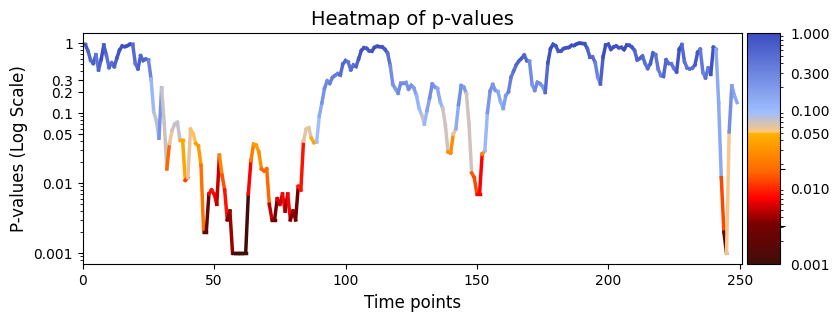
plot_heatmap from the graphics module.Note: Elements marked in red indicate a p-value below 0.05, signifying statistical significance.
[14]:
# Plot p-values
graphics.plot_p_values_over_time(result_regression_session["pval"], title_text ="Heatmap of p-values",figsize=(9, 3), xlabel="Time points")
[15]:
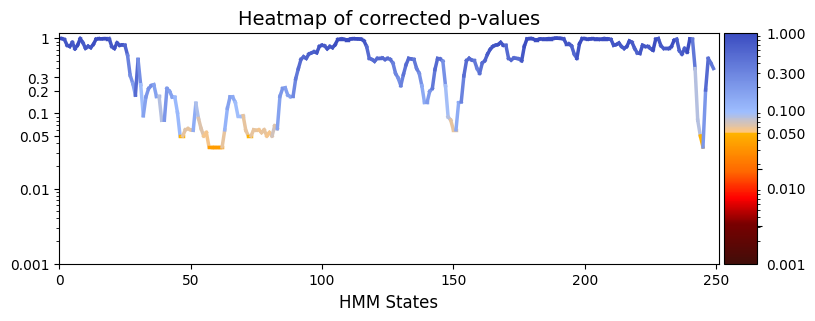
pval_corrected, rejected_corrected =statistics.pval_correction(result_regression_session["pval"], method='fdr_bh')
# Plot p-values
graphics.plot_p_values_over_time(pval_corrected, title_text ="Heatmap of corrected p-values",figsize=(9, 3), xlabel="HMM States", ylabel="")
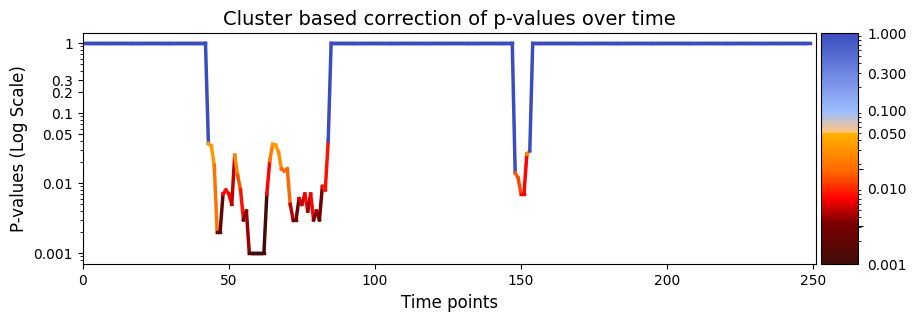
test_statistics_option=True while performing permutation testing, as it is an input to the function (pval_cluster_based_correction).[16]:
pval_cluster =statistics.pval_cluster_based_correction(result_regression_session["test_statistics"],result_regression_session["pval"])
# Plot p-values
graphics.plot_p_values_over_time(pval_cluster, title_text ="Cluster based correction of p-values over time",figsize=(10, 3), xlabel="Time points")
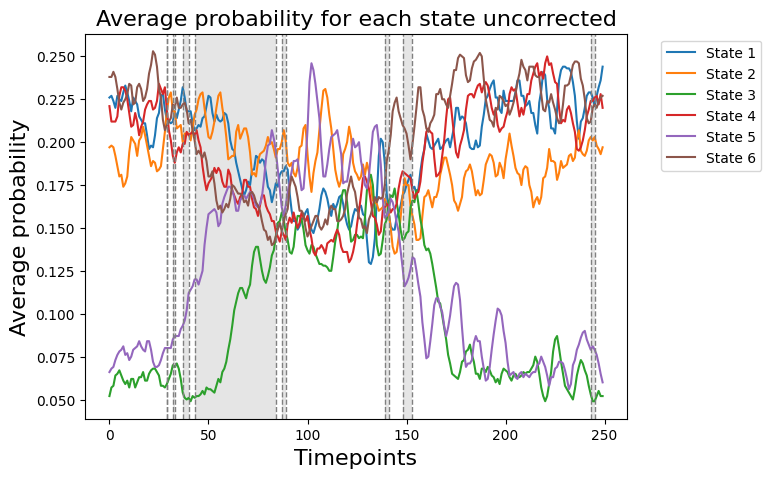
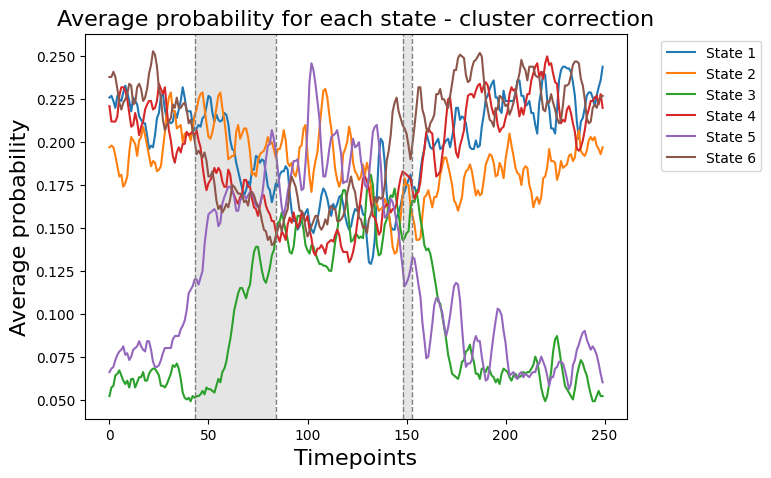
We can now compare if the results from result_regression_trials["pval"] correspond to the average probability for each state
[17]:
# Detect the intervals of when there is a significant difference, will be highlighed
alpha = 0.05
intervals =statistics.detect_significant_intervals(result_regression_session["pval"], alpha)
print(f"intervals of significant p-values:\n{intervals}")
title = "Average probability for each state uncorrected"
graphics.plot_average_probability(Gamma_reconstruct, vertical_lines=intervals, highlight_boxes=True, title=title)
intervals of significant p-values:
[(29, 29), (32, 33), (37, 40), (43, 84), (87, 89), (139, 141), (148, 153), (243, 245)]
[18]:
# Detect the intervals of when there is a significant difference, will be highlighed
alpha = 0.05
intervals =statistics.detect_significant_intervals(pval_cluster, alpha)
print(f"intervals of significant p-values:\n{intervals}")
title = "Average probability for each state - cluster correction"
graphics.plot_average_probability(Gamma_reconstruct, vertical_lines=intervals, highlight_boxes=True, title=title)
intervals of significant p-values:
[(43, 84), (148, 153)]
Conclusion - Regression session#
In the permutation testing across sessions, we aimed to find out how state time courses (D) and reaction time (R) are related across various experimental sessions, all while keeping the trial order in the same. The analysis gave us a variable called pval, packed with 250 p-values, each matching up with a specific time point in our experiment.
Now, the interesting bit: Statistically speaking, the test showed that different time windows (espicially timepoints 30-85 ) showed a significant difference and means that the state time courses (D) are related with changes in reaction time (R). In the context of an experiment, this could represent an important period of cognitive or neural processing relevant to the given task, depending on the experimental design.
Across-trials within session testing - Regression#
From our previous result, it is evident that there are variations at specific time windows across multiple sessions. This indicates significant changes occurring during each experimental session in which the subject is involved.
An intriguing aspect of this dataset is the opportunity to delve into trial-by-trial variability within each experimental session. Even though we observe a significant difference across sessions, it’s possible that there are specific periods across trials that shows variability. This hypothesis can be tested using the function across_trials_within_session.
Gamma_reconstruct (D) and R_session (R). Additionally, you can account for potential confounding variables by regressing them out through permutation testing. Initiating regression-based permutation testing involves setting method="regression". For an in-depth comprehension of the function look at the documentation.Across-sessions within subject testing - Regression
[21]:
# Set the parameters for across sessions within subject testing
method = "regression"
Nperm = 1000 # Number of permutations (default = 1000)
test_statistics_option = True
# Perform across-subject testing
result_regression_trials  =statistics.test_across_trials_within_session(Gamma_reconstruct, R_sessions, idx_sessions,method=method,Nperm=Nperm, test_statistics_option=test_statistics_option)
performing permutation testing per timepoint
100%|██████████| 250/250 [01:47<00:00, 2.33it/s]
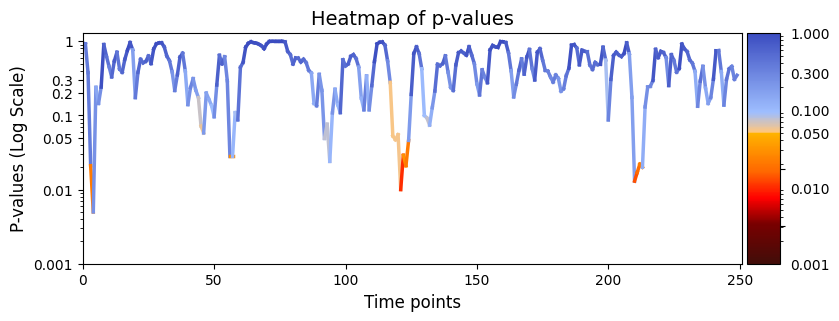
plot_heatmap from the graphics module.Note: Elements marked in red indicate a p-value below 0.05, signifying statistical significance.
[23]:
# Plot p-values
graphics.plot_p_values_over_time(result_regression_trials["pval"], title_text ="Heatmap of p-values",figsize=(9, 3), xlabel="Time points")
[24]:
alpha = 0.05
pval_corrected, rejected_corrected =statistics.pval_correction(result_regression_trials["pval"], method='fdr_bh',alpha=alpha)
# Plot p-values
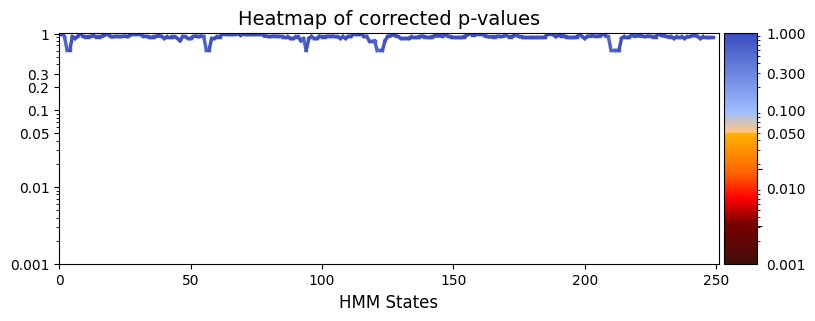
graphics.plot_p_values_over_time(pval_corrected, title_text ="Heatmap of corrected p-values",figsize=(9, 3), xlabel="HMM States", ylabel="")
[43]:
pval_cluster =statistics.pval_cluster_based_correction(result_regression_trials["test_statistics"],result_regression_trials["pval"])
# Plot p-values
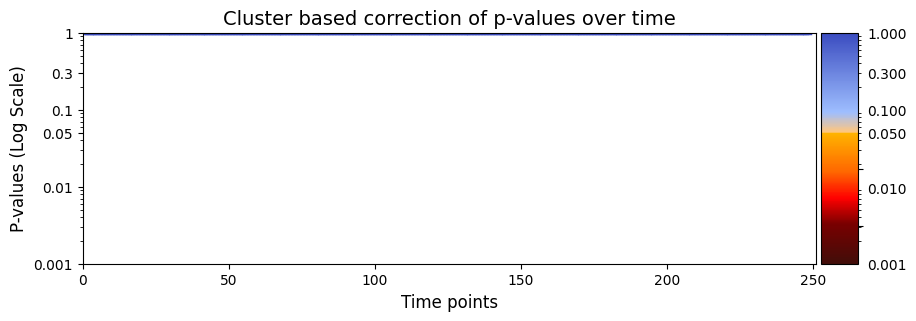
graphics.plot_p_values_over_time(pval_cluster, title_text ="Cluster based correction of p-values over time",figsize=(10, 3), xlabel="Time points")
Conclusion - Regression trials#
In the permutation testing across trials, we tried to find out the relationship between state time courses (D) and reaction time (R) throughout different trials within experimental sessions.
Only a few points showed a significant difference. It means that at those given time points, there are variability in the state time courses (D) and changes in reaction time (R). It shows that there are specific time points across trials within a session that varies and could indicate that certain stages of the experimental task may be associated with distinct patterns of state time courses and consequential changes in reaction time. This variability could reflect critical cognitive or neural events during the task, such as decision-making, information processing, or attentional shifts.
However, the absence of significant differences across the majority of time points and correcting for multiple comparisons had no time points of significant difference. This suggests a stable relationship between state time courses and reaction time throughout most trials within each experimental session. This consistency implies that, on the given session or day, the subject’s performance remains relatively unchanged in terms of the observed state time courses and corresponding reaction times.
Across-sessions within subject testing - Correlation#
Gamma_reconstruct) and behavioral measurements, such as ‘reaction time’.Gamma_reconstruct) contributes in explaining the variability in behavioral measurements across sessions. On the flip side, a non-significant result suggests that the observed relationship might just be a random thing, implying that our state time courses might not explain the variability in behavioral measurements.Gamma_reconstruct (D) and R_session (R). Additionally, you can address potential confounding variables by incorporating permutation testing. Quick reminder: for correlation-based permutation testing, go with method="correlation" to get the correlation coefficients and p-values.[20]:
# Set the parameters for between-subject testing
method = "univariate"
Nperm = 1000 # Number of permutations (default = 1000)
# Perform across-subject testing
result_univariate =statistics.test_across_sessions_within_subject(Gamma_reconstruct, R_sessions, idx_sessions,method=method,Nperm=Nperm, test_statistics_option=True)
performing permutation testing per timepoint
100%|██████████| 250/250 [05:18<00:00, 1.27s/it]
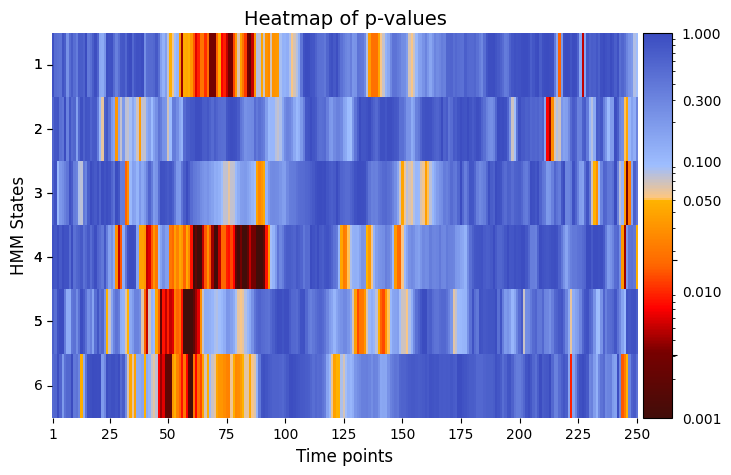
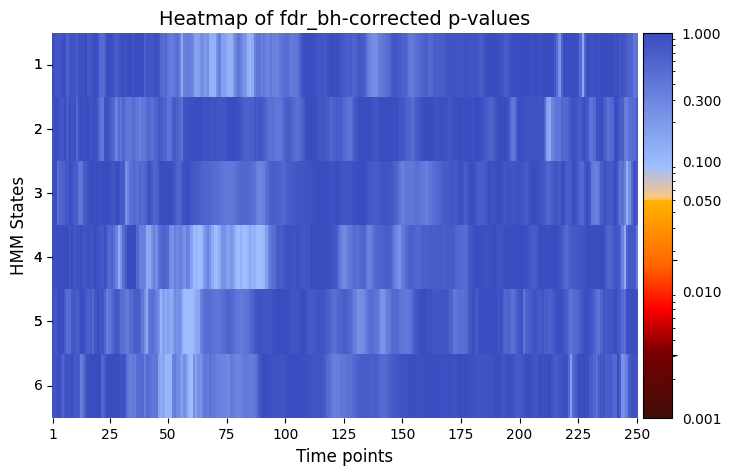
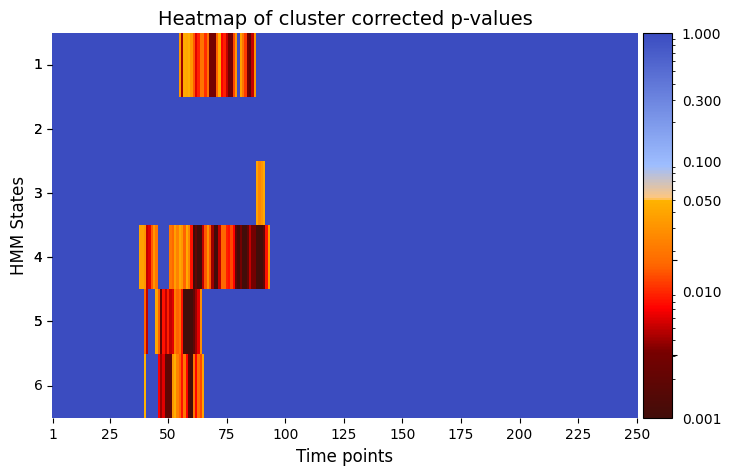
plot_heatmap from the graphics module.Note: Elements marked in red indicate a p-value below 0.05, signifying statistical significance.
[84]:
# Plot p-values
# Pvalues between reation time and each state as function of time
graphics.plot_p_value_matrix(result_univariate["pval"].T, title_text ="Heatmap of p-values",figsize=(8, 5), xlabel="Time points", ylabel="HMM States", annot=False)
[90]:
alpha = 0.05 # threshold for p-values
pval_corrected, rejected_corrected =statistics.pval_correction(result_univariate["pval"], method='fdr_bh', alpha=0.5)
# Plot p-values
graphics.plot_p_value_matrix(pval_corrected.T, title_text ="Heatmap of fdr_bh-corrected p-values",figsize=(8, 5), xlabel="Time points", ylabel="HMM States", annot=False, alpha = alpha)
[89]:
pval_cluster =statistics.pval_cluster_based_correction(result_univariate["test_statistics"],result_univariate["pval"])
# Plot p-values
graphics.plot_p_value_matrix(pval_cluster.T, title_text ="Heatmap of cluster corrected p-values",figsize=(8, 5), xlabel="Time points", ylabel="HMM States", annot=False, alpha = alpha)
Plot Correlation Coefficients
[88]:
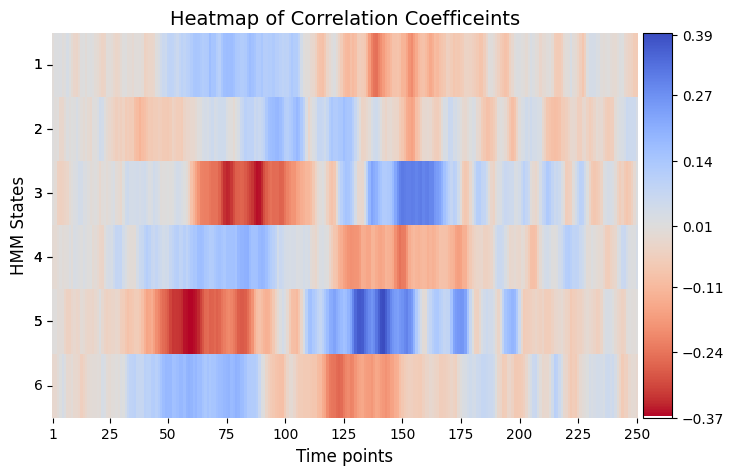
# Plot correlation coefficients
# Correlations between reation time and each state as function of time
graphics.plot_correlation_matrix(result_univariate["base_statistics"].T, result_univariate["performed_tests"], title_text ="Heatmap of Correlation Coefficeints",figsize=(8, 5), xlabel="Time points", ylabel="HMM States", annot=False)
Conclusion - Correlation#
The permutation testing analysis using correlation tries to find relationship between gamma values decoded from a HMM and reaction time across multiple experimental sessions. The resulting matrix, (result_correlation["pval"]), takes the form of (time points x states) and shows session-specific variations in the correlation between state time courses at specific timepoints and the simulated reaction time. Hence, it provides information for the time-dependent and state-specific correlation
patterns.
A significant p-value for a particular HMM state and timepoint indicates that the correlation between state time courses (HMM state) at that specific time point and the presence of behavioral measurements significantly differs across experimental sessions. This shows that there are session-specific variations in that given time points or time windows.
We can see that the correlation are mainly between 25-175 time points before flattening out in the end. This absence of correlation towards the end of each trial makes sense, as this is when the signal plateaus or flattens out.
Nevertheless, it is crucial to contextualize these results within the framework of your experimental design and hypotheses. Differences in conditions during sessions may signify meaningful variations in correlation patterns relevant to the research questions. Therefore, interpreting the results in light of your experimental design is essential for a comprehensive understanding of the observed correlations.